Trader Atlas
Pick an insider. See every open-market buy they have filed, plotted against the share price on the day the market learned about it.
One of seven tools in the members area. Its companion, the Filings Browser, answers the question the other way round — start with a company and see everyone who traded it — and the Cluster Buys page finds the moments when several of them bought at once.
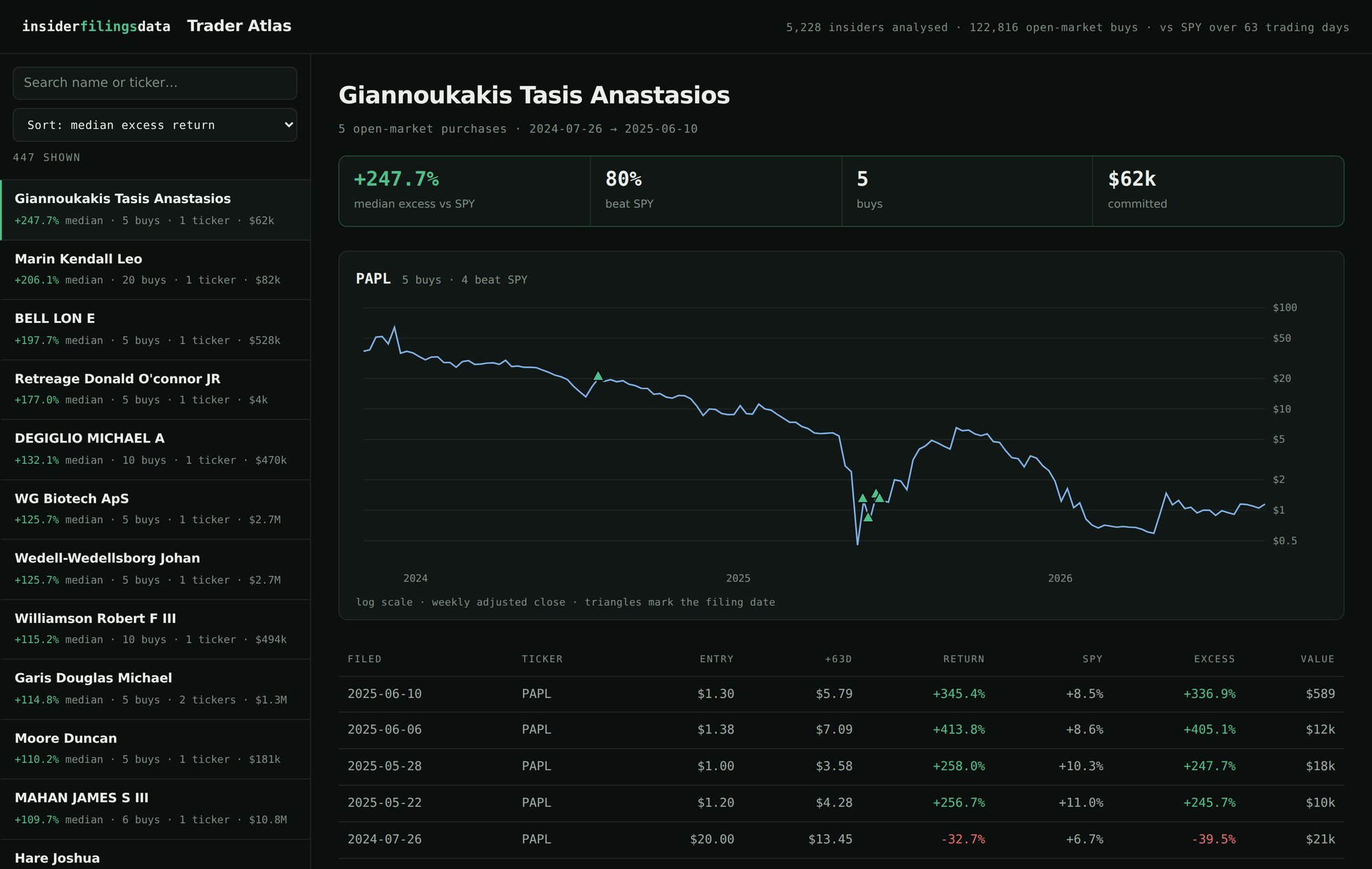
The tables answer questions you already know how to ask. The Atlas is for the ones you don't — the shape of a person's filing history, whether their purchases cluster around lows or highs, how a whole board behaved in the same quarter.
What it shows
- 447 insiders, ranked. Drawn from 5,228 filers and 122,816 open-market buys — every insider with at least five qualifying purchases, sorted by the median excess return that followed them.
- Buys marked on the price line at the filing date — the day the information became public, not the day the trade happened.
- Split-adjusted closes on a log axis, so a decade of price history stays readable on one screen instead of collapsing into a flat line.
- The full transaction list underneath — filing date, share count, price paid, dollar value, and the return over the next 63 trading days.
How the numbers are built
A qualifying buy is a Form 4 open-market purchase — transaction code P. Grants, option exercises, gifts and dispositions are excluded. Excess return is the stock’s total return over the 63 trading days after the filing date, minus SPY over the same window, so a name that only ever bought in 2020 is not credited for the market carrying it. Tickers whose price history contains unadjusted split artifacts are dropped rather than left to produce impossible numbers.
How you get it
The Atlas lives at insiderfilingsdata.com/members, alongside the Filings Browser. Sign in with the email address you subscribed with — we send you a link, so there is no password to remember — and the Atlas opens in your browser. The Filings Browser beside it refreshes every morning; the Atlas is a multi-year track record, so it rebuilds on the slower cycle the underlying files follow. Cancel and access stops; nothing to uninstall.
What it is not
It is a way of looking at what has already happened, not a screener that tells you what to buy and not a track record you should trade on. Past filing activity by any insider says nothing reliable about future prices, and a chart makes coincidences look like patterns more readily than a table does. Treat what you see as a question worth investigating, never as an answer.